Pinned Tabs in Zen Browser
I recently switched from Firefox to Zen, since Mozilla won't stop fucking around with inane AI features and Google cannot be trusted. Zen has some great features, including a UI mostly shoved into the sidebar, pop-up pages, and split tabs. It also handles pinned tabs really nicely but I didn't grok them right away, so I'm writing up my findings here.
In Firefox, I have a bookmark bar with folders of frequently-viewed pages: Jira boards, collections of pull requests, dashboards, etc. Clicking on a bookmark opens an ephemeral tab that I close when I'm done. I also have a few pinned tabs for things like email.
Zen, on the other hand, organises pinned tabs in two different ways, with different visual treatment and ways of handling tab persistence.
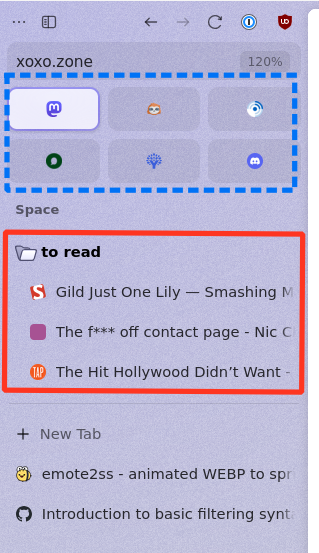
At the top we have "Essentials," a grid of pins (the blue dashed box in the above screenshot). They are somewhat similar to pinned tabs in Firefox.
- Clicking an on-site link will navigate within the tab.
- Clicking an off-site link in the tab will open a pop-up "Glance" page.
- Closing or "unloading" the tab will reset the pin to its original location.
The tabs between Essentials and the "New Tab" button (red solid box) are also pinned tabs, but they work a bit differently, especially when organised into folders:
- Same behaviour as Essentials with regards to clicking links and resetting the tab.
- Collapsing a folder of pins will hide child tabs and sub-folders.
- Hovering the folder shows a popup with the folder contents.
- Clicking a tab in the popup will show that tab under the collapsed folder, until that tab is unloaded. The various "Switch to Tab" methods that open a pin will act the same way.
- Tabs can be unloaded individually or folder-by-folder.
- A pinned tab title can be renamed by double-clicking the name in the sidebar.

In aggregate this feels really different from how I use the Bookmark Bar and pinned tabs in Firefox, but I'm a total convert after a day using it. Many of the pages I visit in a workday are recurring and temporary. Zen lets me load my pull requests tab, click around to do my work, and Cmd-W to close the tab to reset it for next time. I can even bind a key to quickly reset the pinned tab to the original URL. This keeps the page confined to a single consistent part of the sidebar, which is a real boon to the way I want to work.
Props to the Zen folks for a really great addition to the browser landscape.